Build Lab / Tactical Tool
STAR WARS Zero Company Build Planner
Build a Zero Company operator with compatible specializations, abilities, weapons and mods, then see calculated combat results and customize published operator setups.
✓ Verified game values◈ Calculated results✦ Build recommendations⚠ Partial / unsupported
Published Setup
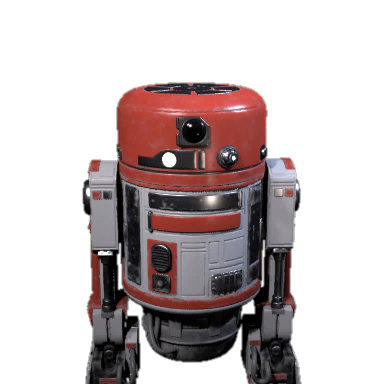
BR-1
Starting Path: Astromech
No equipped weapon / No equipped weapon
2. Specialization Paths
Core Path
Astromech
✓ Starting specialization
Secondary Path
Scout
✦ Build slot — your selection
Core Path and Secondary Path describe this build setup, not a universal ranking of either specialization.
Core Path and Secondary Path describe this build setup, not a universal ranking of either specialization.
Starting specialization Astromech · Support · Utility · 11 ability families · Character-specific (BR-1)
3. Abilities & Talents
Abilities
- Built-in ThrustersAstromechCompatible specialization ability
- Coordinated SupportAstromechCompatible specialization ability
- Deep CoverAstromechCompatible specialization ability
- Enhanced ScannersAstromechCompatible specialization ability
- Extended StorageAstromechCompatible specialization ability
- Hardened FrameAstromechCompatible specialization ability
- Improved MotorsAstromechCompatible specialization ability
- Into The SmokeAstromechCompatible specialization ability
- Self RepairAstromechCompatible specialization ability
- Storage OptimizationAstromechCompatible specialization ability
- TinkererAstromechCompatible specialization ability
Talents
Operator-specific
- Built-In ComlinkAstrogator · BR-1Character-specific talent
Test Rank — ranks are shown for testing only.
4. Weapon
No equipped weapon
⚠ BR-1 does not use a blaster on this loadout.
✓ Game value · Equipped weapon
5. Weapon Mods
Weapon Mods unavailable for this current loadout.
6. Utilities
No utility selected.
Utility slot count is not resolved in this data layer, so the Planner adds utilities instead of inventing fixed slots.
7. Cross Training
No Cross Training selected.
Verified pair-linked options
⚠ No pair-linked Cross Training is resolved for this operator yet.
Test a Cross Training Effect
Calculation does not imply availability. Hypothetical effects are shown separately and stay out of the exact result.
Cross Training availability is pair-linked and is not resolved for this operator. Testing an effect here does not mean the operator can learn it.
Relationship Effects
- A Friendly Game · Both Operators enjoy some friendly games and gain +40 Bond XP.
- Conflict Resolution · Both Operators work through some of their differences and gain +40 Bond XP.
8. Combat Conditions
Current conditions: Close Range + 3 Strike Points
Continue
Build Ready
Damage
Not calculated
⚠ Partial model
Crit Chance
Not calculated
⚠ Partial model
Hit Chance
Not calculated
⚠ Partial model
This interaction is not included in the current calculation model.
⚠ Partial / unsupported
The supported Defense/Penetration relation is included, but some special final execution interactions are unresolved.
Combat Conditions
Close Range + 3 Strike Points
Build Status
- Operator✓ BR-1
- Specializations✓ Astromech + Scout
- Weapon✓ None equipped
- Mods✓ none available
- Utilities✓ 0 selected
- Calculation· Not calculated
Utilities: Utility slot count is not resolved in this data layer. Calculation: Defense/Penetration is included, but some special final execution interactions are unresolved.
⚠ Scout is not available
Scout is character-specific. BR-1 cannot use it.
⚠ No equipped weapon
Weapon Mods are unavailable for this loadout because the operator does not use a blaster.
Compare Builds
How to Use the Build Planner
- 01Choose Operator
- 02Select compatible specialization paths
- 03Configure weapon, mods and supported utilities
- 04Set combat conditions
- 05Review exact values and calculated results
Build Planner FAQ
- Does the Build Planner change my game?
- No. This planner is a website tool. It shows what the production game data says and what the supported combat rules produce. It never changes your save or your in-game loadout.
- Can I save a build?
- Yes. Save Build stores the current build on this device, together with the game-data version it was created with.
- Can I share a build?
- Yes. Share Build copies a link that encodes only the build state. Shared links point back to the Build Planner and are not indexed.
- Can every operator use every specialization?
- No. Some specializations are character-specific. The Planner only offers paths the selected operator can actually use.
- Can I equip any weapon on any operator?
- No. Operator Weapons show the verified equipped weapon. Comparing a weapon profile is a simulation and is labelled as such.
- Why does a mod show as inactive?
- Some mods only apply under a condition such as Close Range, Stationary or First Turn. When the condition is off, the mod stays visible but contributes nothing to the result.
- Why is a result Not calculated?
- If a weapon or interaction is not in the supported combat model, the Planner shows Not calculated instead of inventing a number.
- Are recommendations game rules?
- No. Recommended setups and training paths are marked as recommendations. Game values, calculated results and recommendations are labelled separately.
- Can I load a published build?
- Yes. Start from a published setup and change any part of it. Once you change something, the build is labelled as a custom build based on that setup.
- Operators
- 8
- Specialization paths
- 13
- Weapon profiles
- 4
- Weapon mods
- 64
- Utilities
- 79
- Abilities & talents
- 495
- Calculated results
- Damage · Crit · Hit
Game values, calculated results and build recommendations are labelled separately. Unsupported interactions show Not calculated instead of an invented number.
Published setups:
8 published setups · Operators 8 · Specialization paths 13 · Weapon profiles 4 · Weapon mods 64 · Utilities 79 · Abilities & talents 495 · Calculated results Damage · Crit · Hit